
Roblox BedWars just got a brand new update that allows you to start custom matches in the game. This is a great feature that will give you a chance to play with your friends in a single match. You can also spectate the match, and join specific color teams. This is a great way to have a more custom experience within Roblox BedWars!
How to do Custom Matches
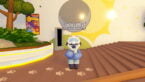
To do a custom match in Roblox BedWars, you will need to turn around from where you spawn in the game and talk to the NPC that says “Custom Matches” over their head. From here, you can join a custom match by inputting a code, or start one by select a gamemode and map and clicking on Create Match!
The NPC can be a bit hard to find because there will likely be a lot of players surrounding them. It’s just across from the purple Islands portal, just look for the Custom Matches name and click on them to open up the menu.

Now that you have the menu open, you can either join a match or create one. If you want to join a match, you will need the code of the map you want to join. Whoever is hosting the match should have this code at the bottom of their screen. You can also create the match in this window by selecting the gamemode and picking a map!

If you created a match, you will now enter into it with some options available to you. The most important is the “Join Code: XXXX” that you will need for others to join you. Copy down that code, because that’s what you will need to give to anyone you want to join your game. You can also pick the color of your team, and start the match from this area.

According to the Roblox BedWars Twitter account, you can have a max players of 700 in a match. So, gather your whole family for a couple of rounds of BedWars next time they are available.
If you want to try your own custom matc then be sure to tryout Roblox BedWars. You can also check out our BedWars kits post to see all of the available kits that you can choose from!



whats the command for joining full team matches?
This did not really help I wanted to make a custom map where I can create the hole thing this is not that helpful 😞
Well maybe you should look for a guide that discusses custom maps and not custom matches?
How do you share that code online on iPad?
You just write it out in a notepad and give it to another person?
Uhh why are there no options when I create?