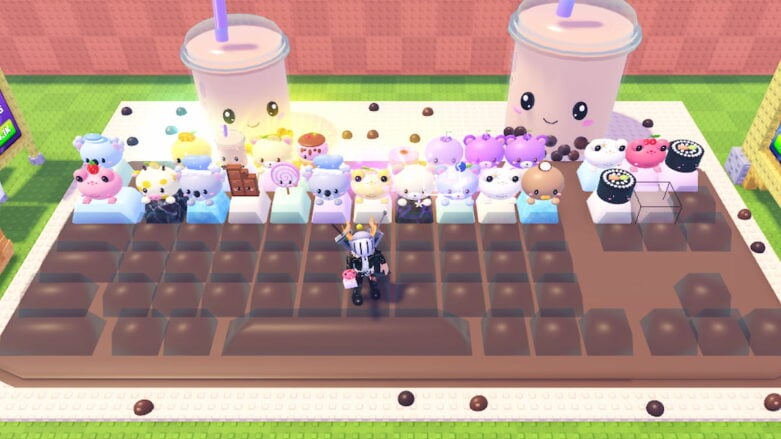
In Roblox Custom Keyboards, you kick and roll your keyboard to see what rare keycaps you can get, then put them together to build your own crazy setup. I keep trying for the weirdest combos and stepping on my keyboard to rack up more cash every time. Sometimes I just go all out and try to unlock some wild mutations, and it’s fun seeing how much you can upgrade everything with new stuff. There’s always some new keycap or keyboard to test, so it never gets boring!
Use Custom Keyboards codes to get Legendary Packs, Boost Items, and more for a head start on purchasing upgrades and more faster! It takes time to hunt for working codes, but we have already found them to help you grab extra packs and boost your keyboard while you play.
All Codes for Roblox Custom Keyboards List
Active Custom Keyboards Codes (Working)
- PETS – Redeem code for Freebies (NEW)
- STICKERS – Redeem code for Freebies (NEW)
- 6MILVISITS – Redeem code for Freebies
- DUMPLING – Redeem code for Freebies
- UPDATEYAY – Redeem code for Freebies
- 6000LIKES – Redeem code for Freebies
- NEWRARITY – Redeem code for Freebies
- 200KMEMBERS – Redeem code for Freebies
- 4MILVISITS – Redeem code for Freebies
- 5000LIKES – Redeem code for 50 Boba, Legendary Pack, 2x Luck for 10 mins, 4x Roll, 2x Kick Power, and 50% Slower Wave Item
- 200KFAVS – Redeem code for Legendary Pack, 2x Luck for 10 mins, 4x Roll, x2 Wheel Spins, and 50% Slower Wave Item
- 200KMEMBERS – Redeem code for Legendary Pack, 2x Luck for 10 mins, 4x Roll, x2 Wheel Spins, and 50% Slower Wave Item
Find codes for a bunch of other games in our Roblox Games Codes page.
Expired Custom Keyboards Codes (Not Working)
- There are currently no expired codes for Custom Keyboards
How to Redeem Custom Keyboards Codes
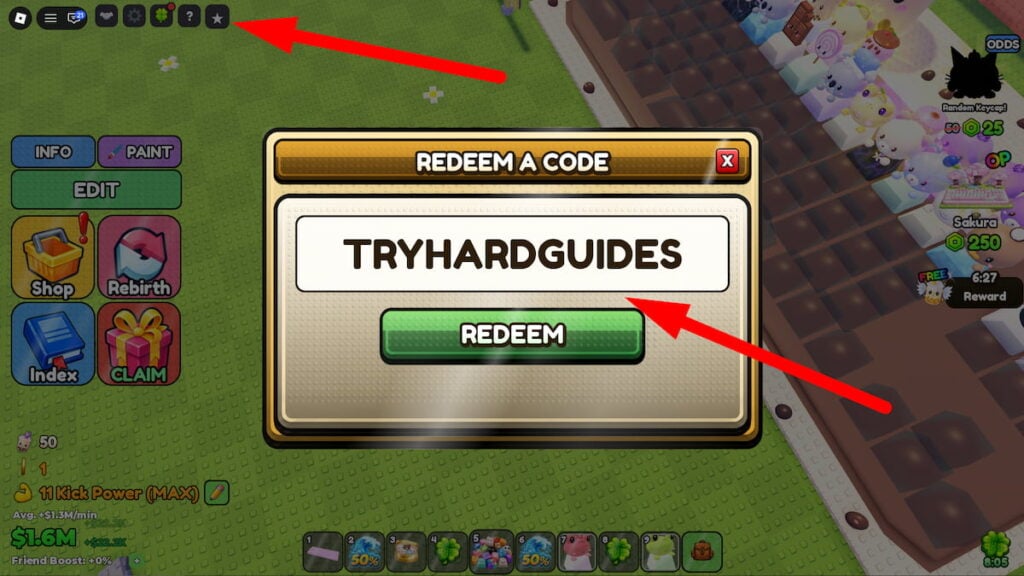
To redeem codes in Roblox Custom Keyboards, you will need to follow these steps:
- Press the Star button in the top left corner of the screen.
- Enter a working code in the ENTER CODE text box and hit the green REDEEM button.
- If the code is still active, you’ll get your free rewards instantly.
- If not, let us know in the comments!
Be sure to use codes from our Custom Keyboards list quickly, as they may expire soon.
If a new code isn’t functioning, try exiting the game and launching it again. This moves you to another server, likely with a more recent game update, allowing the code to work correctly!
How to Get More Custom Keyboards Codes
To find more Custom Keyboards codes, I’ve found that keeping an eye on official pages has been great methods for discovering the latest codes and reaping their rewards:
- Bookmark this page (press Ctrl + D) and check back for updates!
- Join the Kick a Keyboard Roblox Group
Why Are Custom Keyboards Codes Not Working?
If a Custom Keyboards code isn’t working, here’s what to check:
- Mistakes Happen: Double-check if you’ve typed the code exactly right. It’s easy to miss a letter or number! Copy and paste from this guide or the official game sources to be sure.
- Codes Expire: Just like milk, codes can go bad! Developers often give a heads up when a code’s about to expire, but not always. The best bet is to use codes right away when you find them.
- Capitalization Counts: Pay close attention to capital letters in the code – they matter!
- Server Glitches: Sometimes a new code might not work on every server right away. Try logging out and back in, or finding a different server to play on.
Still no luck? It might mean the code is expired. Let me know in the comments if you find any that aren’t working anymore, and I’ll update the list to help everyone out!
When Are New Custom Keyboards Codes Released?
Kick a Keyboard doesn’t have a set schedule for new code releases, but based on my experience playing and following the game, here’s when you’re most likely to see them:
- Big updates: Whenever the game gets a major overhaul or adds new content, keep an eye out for accompanying codes.
- Special occasions: Holidays and anniversaries are often celebrated with code giveaways. Stay tuned to the official channels for announcements.
- Community achievements: Sometimes, reaching player milestones or popularity goals can trigger the release of new codes.
- Unexpected downtime or issues: If the servers go down or major bugs pop up, may offer codes as a way to say sorry and keep players happy.
Those are all of the Roblox Custom Keyboards codes we currently have listed. If you see one that we’re missing, please let us know in the comments so we can add it right away!



Comments