
Lost Ark’s guild feature is reminiscent of similar clan mechanics in other popular MMORPGS. It allows players to join together and create their own mini-community in the wider social sphere of Lost Ark, taking on group content and sharing achievements with one another as they explore the world. In this guide, we’ll cover the many ways you can personalize your guild, even after you’ve made it.
Creating a Guild in Lost Ark
Before you can customize your guild, you’ll need to have one made. Creating a guild can be done as soon as a player leaves the tutorial, so long as they have the 2,000 silver creation fee. Open the guild tab by clicking “Community” on the bottom right corner of the screen and then selecting “Guild” from the pop-up menu. From here, you can use the “Create Guild” tab to make your first guild.
When creating a guild, you can check the “Add to Suggested Guilds List” option to have your guild show up to players looking for a guild to join.
Changing Guild Emblem, Flag, and Name
If you’re not happy if your guild’s customization options or are looking for a change, you can easily change the options you selected during guild creation. To access the customization options, open up your guild screen. Then, navigate to the top right corner and click the right-facing arrow.

This will reveal the “Manage” tab of the guild screen. From here, you will be given the full range of options for customizing your guild, including the ability to change your emblem, flag, and name. You also have access to the guild’s description and notice features. Please note that only the guild master is able to make these changes. This page is also where you’ll find the option to leave the guild.
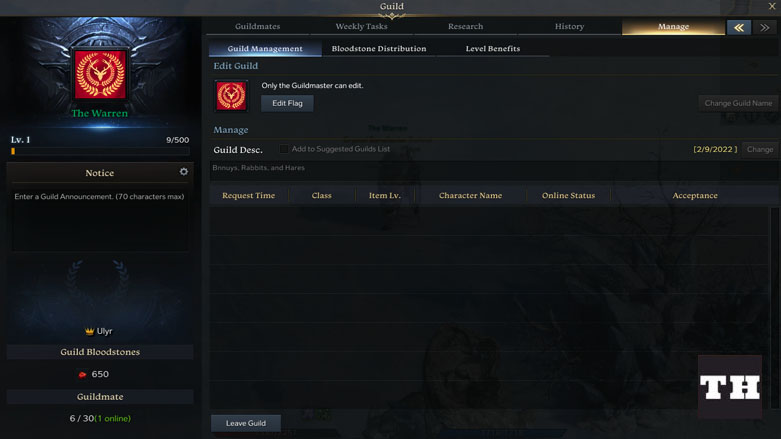
Changing the guild’s flag and emblem is easy, and can be done without charge. Changing the name, however, is a little bit more complicated, requiring the use of a guild name change ticket. Name change tickets can be purchased from the Lost Ark in-game store, and cost 2,900 Royal Crystals, or about 30 USD.
On the manage screen you also have access to the guild’s join settings. Join settings allow you to determine who can join your guild, with four different options for how to handle join requests. Join instantly allows new players to join your guild without contest, while subject to approval and password required means that new players must be approved to join or need a password to join, respectively. The deny option will automatically prevent anyone from joining your guild.
That’s everything you need to know about managing your guild in Lost Ark! We hope this guide helped you and your friends come together. Special shoutout to The Warren for being the coolest guild in Lost Ark! Check out our other Lost Ark guides for more ways to interact with the community.

How can you kick someone from the guild?