
Cookie Run Kingdom has just released the big Guild Battle update into the game in January 2022. This has no doubt pushed a lot of players to rethinking their guild affiliations, so many are looking to leave their guilds to join new ones or start their own. If that’s the case for you, then we’ll walk you through the new process of leaving your guild in Cookie Run Kingdom with this easy to follow guide!
Find all of the available freebies for the game on our Cookie Run Kingdom Codes post!
Leaving Guilds in Cookie Run Kingdom
To leave a guild in Cookie Run Kingdom, you will need to head to the guild section of the game which can be accessed from a button at the bottom of the main menu. When you’re in the Guild area, tap on the Guild name at the top left of the screen. Once at the Guild Table, tap on the Guild name again, then hit the Leave button at the bottom of the menu!
From pretty much any menu, you should see the Guild button at the bottom of the screen. Just click on that and if you are in a guild you will be transported to the Guild Domain. At the top right of the screen will be your Guild’s avatar and the name of the Guild. Just tap on that to be transported to the Guild Table.
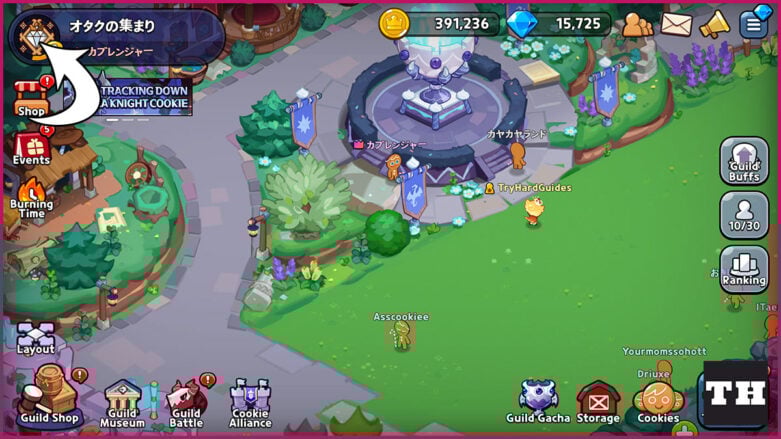
Once you enter the Guild Table area, you will then need to click on the same avatar button at the top left of the screen. This will open up the Guild Info menu, and you should see the Leave button at the bottom. Just tap on that button and you can then confirm that you want to leave the guild.

Keep in mind that once you leave a guild, you will have to wait a full 24 hours to join a new one or create your own. Make sure you want to leave, because your previous guild might fill up and you won’t be able to get back in!
Deleting or Closing Your Guild
If you’re the Guild Leader and want to delete your guild. You need to go to the same window and instead of the Leave button, you will find the Close button. Tap on that and then enter in the exact name of your guild into the text box. If you got it correct, the Close button will glow red. Tap on that and confirm that you want to delete the guild. There’s no going back from this once you accept, so make sure you’re sure you want to do it!

That’s everything we know about leaving your guild in Cookie Run: Kingdom. Be sure to check out the Cookie Run Kingdom section of our website for more details on the game.

I was made the leader and don’t don’t how to give it to someone else so I can leave.
You should be able to click the manage button and grant leader permissions to someone else.
what do I do if the close button is grey and doesn’t let me click it?
I would like to mention that you forgot something, and that is that you can’t delete/leave a guild if the guild is tallying the results for the guild battles. I actually just experienced today, so I’m not sure if this is new, but I just wanted to let you know so this post could be a bit more accurate. Thank you for reading this (if you read this.)
My guild isnt tallying the results but it still doesnt let me delete it!! Help
What about the items you bought for the guild? Will they disappear or stay in the guild when you leave?
If you leave a guild, do you lose your guild gacha points?
No, you keep them, but you can’t spend them until you join a new guild
Thanks for the answer!
What if the button to close your own guild is grey and won’t let you click it?
It’s supposed to be grey, but it should let you click it. Might be a bug, I don’t know.
its the same for me, grey and un-clickable. it probably isnt a bug, but its definitely supposed to happen.
how do i delete a guild i made?
It’s the same process, you just hit the Close button that will be in that window. I added a bit about it in the post.