
In Dress To Impress (DTI), clothes stack on top of each other unless you actively take them off. While this is nice if you’re mixing and matching clothes, you’re not told how to take them off. Below, we’ll show you how to remove clothes in the game.
For access to free costumes and items, visit our Dress To Impress codes page! Also, make sure to read our guides on How To Change Skin Color and How To Get Long Nails.
How Do You Take Clothes Off In Dress To Impress (DTI)?
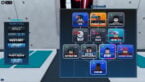
To remove your clothes in Dress To Impress (DTI), just tap the button on the right side of the screen that looks like someone with blonde hair. We have an image below to help you. This is for both male and female characters.

This will show you all the clothes you are wearing. You can choose which one to take off by tapping the X button. This way, you can easily change your outfit in the game. Hurry about this, because less clothes can hurt the amount of stars you get, so be sure you match the theme before time is up.
Remember that if you take anything off, you have to go back to where you found it to put it on. So you should be sure it’s really something you want to remove before taking it off.




Comments