
Discord is a vast platform that allows you to create communities, message people, and keep in touch with your friends. You can use it to chat with people with text messaging, voice, and even video calls. It is a very versatile piece of software that can be used on your mobile device or computer. If you’re looking to make sure that you don’t spoil things by showing an image that people might not want to see, we’ll show you how to hide it as a spoiler on your Android and Apple mobile devices in this guide.
Spoilering an Image on Discord Mobile
Time needed: 2 minutes.
On desktop computers, it’s a lot more obvious on how to spoiler an image with Discord. On mobile, you will need to use one of the common methods that are used when opening up additional options with many applications.
- Tap on the + button in the text window
Next to the text area where you input your messages, hit the plus sign button to open up the ability to add an image to your message.

- Select the image you would like to spoiler
Scroll through your images and select the photo that you would like to post and spoiler. Selecting the image will not send it immediately!
- Tap and hold the selected image
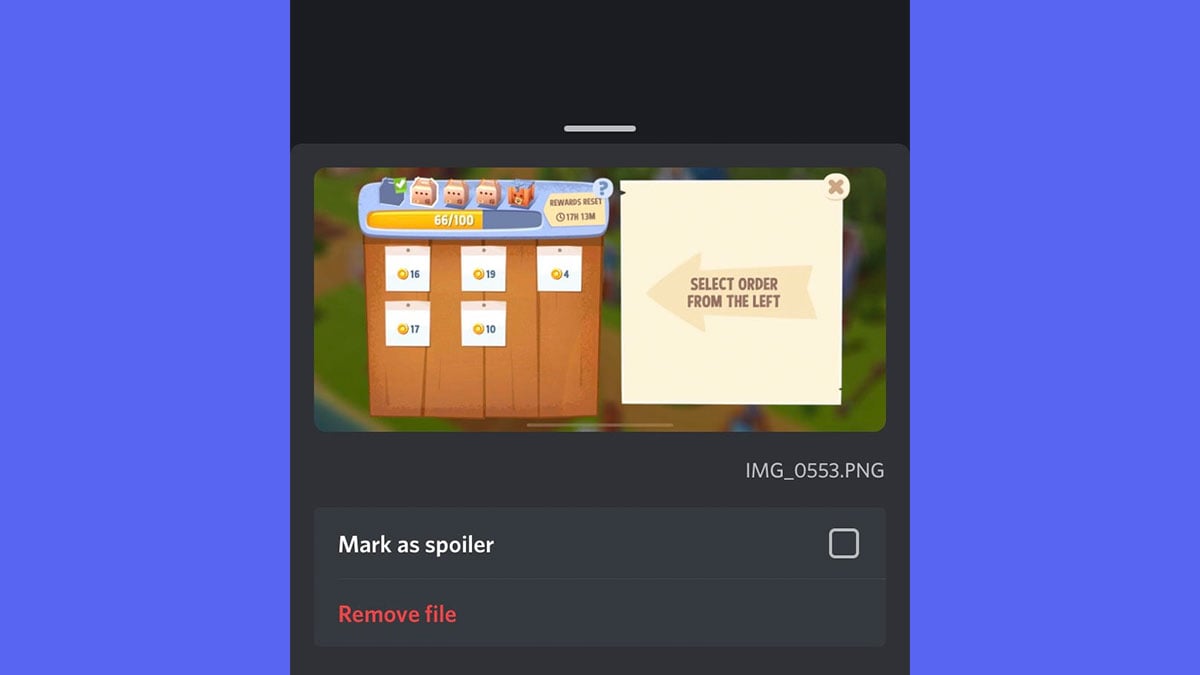
The image you selected should now have entered into the textbox area. Tap on that image, hold it for a second, and then let go of the tap to open up the options window for the photo.
- Tap on the Mark as spoiler checkbox
With the options window open, you should see the “Mark as spoiler” item. Tap on the checkbox to mark it as a spoiler image and then tap above the window to close this menu.
- Verify the spoiler image
The image should now appear to be blurry in your text window. If it doesn’t, then something has gone wrong and I would start over. You can add text to your message if you would like, but it isn’t required.
- Send the spoiler image
Once you’ve verified that the image has indeed been spoilered, you can send it and it should upload the image to the server and say SPOILER on it. Other people should now be able to tap on the image to reveal what it looks like!




That is everything you need to know about how to spoiler an image on mobile in Discord. Check out the Discord section of our website for more useful information about the messaging software!

samsung A50, up to date discord + current OS,
where your + sign is in the example is instead a camera, followed by a image, then the text box, and lastly emojis on the right.
Doesn’t work on a Samsung Galaxy S20+ either.
Doesn’t work for me at all and I use an Android A51
Nope, still doesn’t work on a Samsung Galaxy A11. Seems like it’s working, but just posts the picture.
Just seems like a bug with certain android devices.
uh so the menu doesnt come up ater i hold it instead it just disappears when i take my finger off idk whats going on but i am on an android verizon LG
It seems like an Android issue that occurs with some phones unfortunately.
Yeah this didn’t work for me either. I tried it on my Samsung G10+ and nope. But appreciate you trying.
Seems to be an Android problem. I’ll have to look into it more.
Sadly doesn’t work for me 🙁
Discord need to fix this feature on mobile
im using a ipad gen6 and this doesn’t work for me sadly.
That’s unfortunate, I’ll have to look into this more.
If several people are telling you it didn’t work… maybe it doesn’t work. But just in case you didnt get the message, this did not work for me either.
I’ve tested it numerous times, and I’ve asked for the devices people are using where it doesn’t work. I can’t diagnose a problem if people don’t give me more details.
Doesn’t hecking work
What phone are you using? I’ve tested this multiple times and it works fine.
This does not work at all. Everything seems like it will work correctly until you actually post it. Then it just posts as a normal image.
I showed a literal example of it working, so either Discord is bugged or you aren’t doing something correctly.
I just tested it again and it works fine.
The feature doesn’t work. It marks it as spoiler, but once sent, the images gets sent as normal image
Might be a bug then, because I have tested it and it works fine.
It works fine for an ipad8
Glad to hear that!