
Gundam Evolution is the latest free-to-play 6v6 First-person shooter game. It is currently available on Steam, but will eventually be released for PlayStation 4, PlayStation 5, Xbox One, and Xbox Series X/S on November 30, 2022. In Gundam Evolution, players will take part in high-speed combat and strategic team shooter gameplay. It also features a constantly evolving world with its continuous flow of new maps, units, customization items, and game modes. Stamps, which are their own unique collection of cosmetic images that can be applied to any map surface, are one of the features that come standard with it. If you want to know how to configure Stamps in your palette and how to use them in-game, we’ve got you covered in this guide!
Stamps keybind and configuration
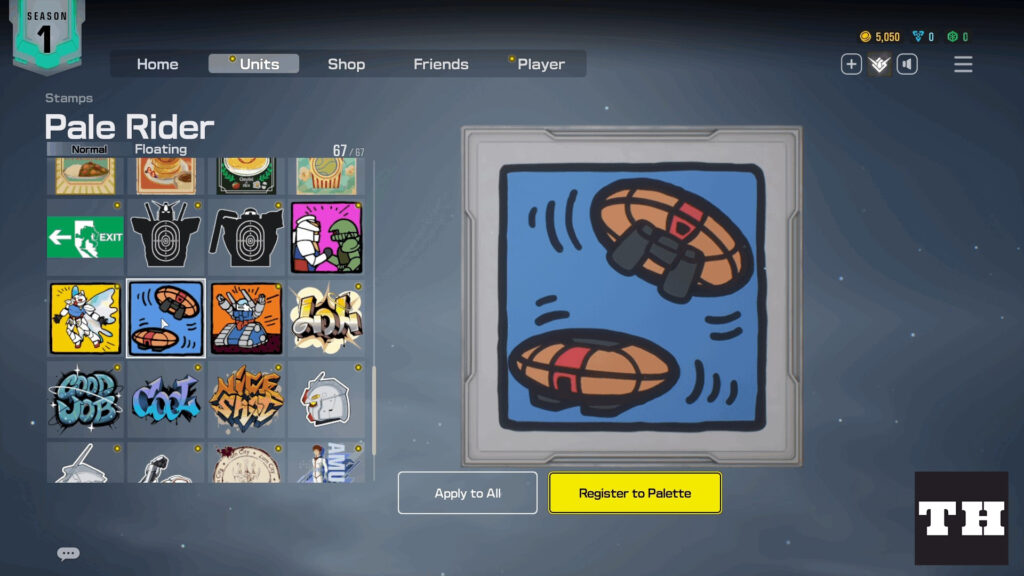
To add Stamps to your palette, head to the Units menu on the Home Screen and click Stamps. You will be presented with a wide variety of creative and vibrant Stamp design options. There are only four available slots in the palette, and they are primarily reserved for emotes, stamps, and pilot voices.
After choosing the Stamp that you wish to add to your palette, click the button labeled “Register to Palette” that is located underneath the Stamp preview. You have the option of configuring palettes on an individual basis for each unit or for all units simultaneously.

Hold the default “T” key or Right-Arrow key for controllers to toggle out the palette and to use the Stamp in-game. Otherwise, you have the option inside the Control Settings to modify the keybinding for the palette or the Radial Menu.
You may unlock a new Stamp design using in-game currencies which vary in price depending on rarity. You could also get it if you bought a Supply Pod from the Shop and it comes with what you received in that bundle.
That’s all you need to know about how to add Stamps to your palette and how to utilize them in-game. For more great content, check out the Games section of our site!

Comments