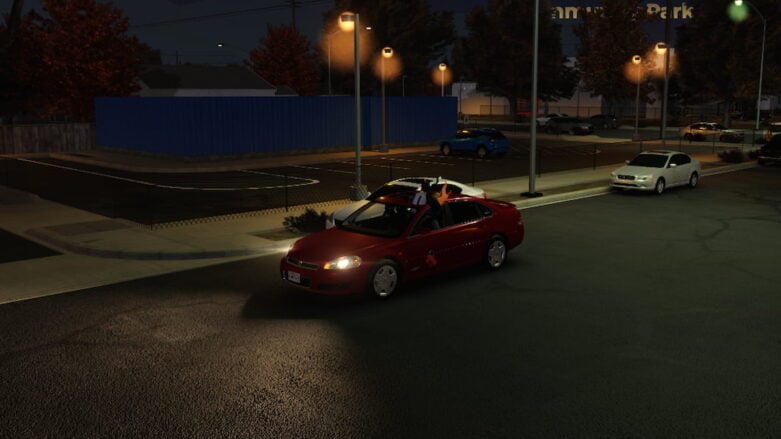
In Roblox Mojave Valley, you can explore a realistic city based on a real California desert location, where you get to drive cool cars to earn lots of money while hanging out with all your friends to create amazing new stories through roleplay in a world of endless fun opportunities.
Use codes to get Cash in Mojave Valley by redeeming them to start saving up for a new vehicle, because searching for active codes by yourself can take a very long time, but we have already found them, so you can buy your dream car as fast as possible!
All Codes for Roblox Mojave Valley List
Active Mojave Valley Codes (Working)
- VENTURACOASTSAYSHI – Redeem code for Freebies [Expires October 15th] (NEW)
Find codes for a bunch of other games in our Roblox Games Codes page.
Expired Mojave Valley Codes (Not Working)
- FIFTYTHOUSAND – Redeem code for Freebies [Expires September 21st]
- PETALCOVE – Redeem code for Freebies [Expires September 6th]
- ANNIVERSARY – Redeem code for Freebies [Expires September 1st]
- FOURTYTHOUSAND – Redeem code for Freebies [Expires August 25th]
- THIRTYMILLIONVISITS – Redeem code for Freebies [Expires July 30th]
- JULY4TH – Redeem code for Freebies [Expires July 10th]
- SUMMERSHOWERPLS – Redeem code for Freebies [Expires July 7th]
- DANGEROUSWOMAN – Redeem code for Freebies [Expires June 24th]
- GRLFROMBROOKLYNTANKED – Redeem code for Freebies [Expires June 20th]
- TWENTYTHREE – Redeem code for Freebies [Expires May 27th]
- MEMORIALDAY – Redeem code for Freebies [Expires May 27th]
- EXPANSIONUPDATE – Redeem code for Freebies [Expires May 30th]
- JDMIMPORTS – Redeem code for Freebies [Expires May 7th]
- LAAATEEEEE – Redeem code for Freebies [Expires March 30th]
- LUNARYEAR – Redeem code for Freebies [Expires February 28th]
- BUGFIX – Redeem code for Freebies [Expires January 20th]
- NEWYEARS – Redeem code for Freebies [Expires January 3rd]
- HYDROLOCKED – Redeem code for Freebies [Expires January 6th]
- WINTER – Redeem code for Freebies [Expires December 26th]
- CATALINAISLAND_TANKED – Redeem code for Freebies [Expires December 26th]
- LIKES3500 – Redeem code for 5,000 Cash [Expires December 17th]
- TWOMILLIONVISITS – Redeem code for 2,500 Cash [Expires December 17th]
How to Redeem Mojave Valley Codes
To redeem codes in Roblox Mojave Valley, you will need to follow these steps:
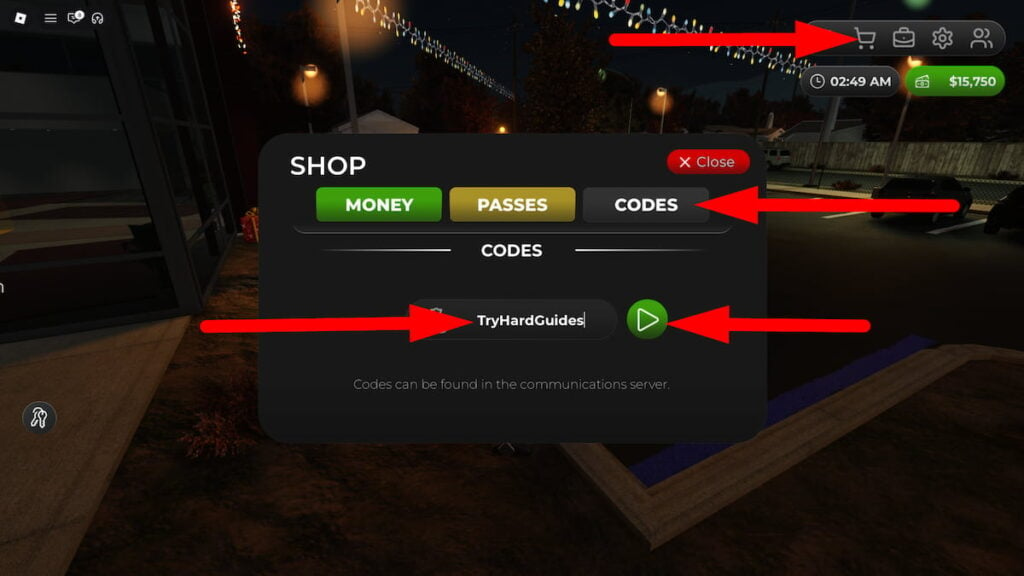
- Press the Shopping Trolley button in the top right corner of the screen, then click on the Codes tab.
- Enter a working code in the ENTER CODE text box and hit the green arrow button.
- You’ll get your free code rewards instantly if the code is still active.
- If not, let us know in the comments!
Be sure to use codes from our Mojave Valley list quickly, as they may expire soon.
Should a newly released code fail to work, consider exiting and then re-entering the game. This action transfers you to a different server, potentially with an updated version of the game where the code functions correctly.
How to Get More Mojave Valley Codes
To make sure you never miss new Mojave Valley codes, I recommend regularly checking the game’s official pages:
- Bookmark this page (press Ctrl + D) and check back for updates!
- Join the Mojave Valley Discord
Why Are Mojave Valley Codes Not Working?
Having trouble with a Mojave Valley code? Here’s some reasons why it may not be working:
- Check for Typos: Make sure you’ve typed or pasted the code correctly. Even a tiny mistake can invalidate it. Use this guide or the game’s official channels as your source for accurate codes.
- Expiration Date: Codes don’t last forever! Developers might announce when a code expires, but sometimes they disappear without warning. So, grab those goodies quickly!
- Capital Letters Matter: Some codes are picky about capital and lowercase letters. Make sure you match the code exactly.
- Server Hiccups: It’s rare, but sometimes a new code might not work right away on every server. Try logging out and back in, or hopping to a different server.
If you’ve done all this and the code still doesn’t work, it might be gone for good. But hey, leave a comment below if you find an expired code, and I’ll make sure the list is up-to-date.
When Are New Mojave Valley Codes Released?
Although the developer hasn’t officially stated when new codes drop, I’ve picked up on some trends based on past releases and what’s happening in the community:
- Major game updates usually mean new codes: Developers often toss in a few codes as a little extra something for players after big changes to the game.
- Holidays and special events: Keep an eye on the game’s social media or Discord – they might surprise you with codes during holidays, and big milestones.
- Community milestones: Sometimes, developers give out codes as a reward when the game hits certain goals, like a certain number of likes or players.
- Server hiccups or bugs: If the game has any downtime or annoying glitches, you might get lucky and see some codes pop up as an apology or compensation.
Those are all of the Roblox Mojave Valley codes we currently have listed. If you see one that we’re missing, please let us know in the comments so we can add it right away!




Comments