
In Roblox Phone Store Tycoon, your dad thinks your phones are not very good, and he believes your store will never be successful. Your big goal is to prove him wrong by creating the greatest phone store ever, making it even bigger than the most popular phone companies in the world.
Use codes to get Cash in Phone Store Tycoon. You just need to redeem them so you can begin upgrading your business much faster than before. It takes a while to find working codes by yourself, but we have already found them to help you build your amazing phone empire.
All Codes for Phone Store Tycoon List
Active Phone Store Tycoon Codes (Working)
- JOINED – Redeem code for 150 Cash (NEW)
- thirdfloor – Redeem code for 200 Cash (NEW)
Find codes for a bunch of other games in our Roblox Games Codes page.
Expired Phone Store Tycoon Codes (Not Working)
- There are currently no expired codes for Phone Store Tycoon
How to Redeem Phone Store Tycoon Codes
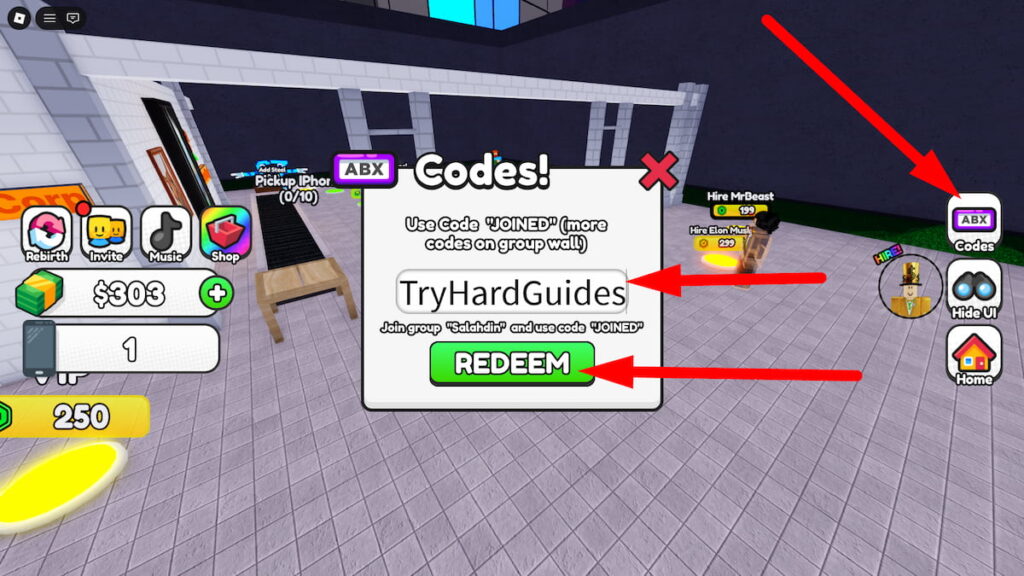
To redeem codes in Roblox Phone Store Tycoon, you will need to follow these steps:
- Press the ABX Codes button on the right side of the screen.
- Enter a working code in the text box and hit the green Redeem button.
- If the code is still active, you’ll get your free rewards instantly.
- If not, let us know in the comments!
Be sure to use codes from our Phone Store Tycoon list quickly, as they may expire soon.
If it’s a brand new code that doesn’t work, try closing out of the game and re-opening it. This will put you in a new server, which could have an updated build of the game where the code will be working!
How to Get More Phone Store Tycoon Codes
I’ve had the most success finding the latest Phone Store Tycoon codes by staying active in the game’s community:
- Bookmark this page (press Ctrl + D) and check back for updates!
- Join the Mega Tycoons Studios Roblox Group
Why Are Phone Store Tycoon Codes Not Working?
If you’re having trouble redeeming a Phone Store Tycoon code, don’t worry! Here are some common reasons and how to troubleshoot them:
- Typos: Even a small error can make a code invalid. Double-check your entry or copy and paste the code directly from a reliable source like this guide or the official game channels.
- Expiration: Codes often have a limited lifespan. Developers usually announce expiration dates, but sometimes they’re removed without warning. Redeem codes as soon as you find them to avoid missing out!
- Case Sensitivity: Some codes are case-sensitive, so ensure you’re entering uppercase and lowercase letters exactly as shown.
- Server Issues: Occasionally, a new code might not work immediately on all servers. Try rejoining the game or switching to a different server if you encounter issues.
If you’ve tried these tips and a code still isn’t working, it’s possible the code has truly expired. Feel free to leave a comment below, and I’ll update the list accordingly to help out other players.
When Are New Phone Store Tycoon Codes Released?
While Mega Tycoons Studios hasn’t publicly announced a specific schedule for new code releases, I’ve noticed a few patterns based on the game’s history and community updates:
- Game Updates: Keep an eye out for new codes whenever the game receives a major update or patch. Developers often include codes as a bonus for players.
- Special Events: Events like holidays and milestones often trigger code releases. Follow the official game channels for announcements.
- Community Goals: Developers sometimes reward players with codes when the game reaches a certain number of likes, favorites, or visits.
- Apologies or Compensation: Occasionally, codes are released as a way to apologize for unexpected server shutdowns or game-breaking bugs.
Those are all of the Roblox Phone Store Tycoon codes we currently have listed. If you see one that we’re missing, please let us know in the comments so we can add it right away!



Comments