
Nintendo has released a patch for the Switch that allows uses to create groups, where you can combine your software and games together! You can make multiple folders, which will organize your various games. While this is a relatively simple feature, it’s a significant addition to the console, particular to users who download a lot of different apps onto their device.
Bluetooth audio devices also received a change, you can use either the console or the volume controls on the Bluetooth device to control the sound levels.
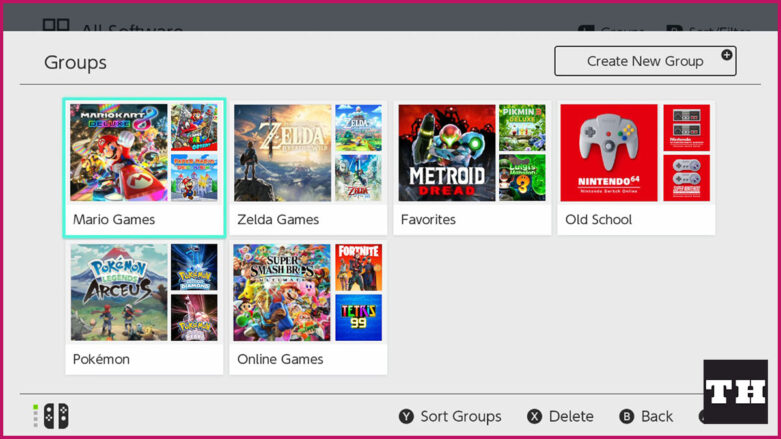
You will find the Nintendo Switch patch notes for version 14.0.0 of the console below.
Ver. 14.0.0 (Released March 21, 2022)
“Groups” feature was added to the All Software menu.
- You can now create groups of software to help organize your software titles.
- Making groups for different game genres, developers, or whatever you’d like to organize by may make it easier to find the application you want.
- Up to 100 groups can be created with a max of 200 titles per group.
- The button to proceed to the “All Software” screen is displayed only when there are 13 or more software title icons on the system.
- For more information, see How to Create Groups of Software.
Bluetooth® Audio volume behavior was changed.
- You can now adjust the volume of Bluetooth audio devices using either the Nintendo Switch™ console or through volume control buttons on the Bluetooth audio device.
- The Bluetooth audio device must support AVRCP profiles for these changes to work.
- The volume displayed on the console will reflect the Bluetooth audio volume when using the device’s control buttons.
- The maximum volume output for some Bluetooth audio devices has been increased.
- When first connecting a device, volume will be reduced to avoid sudden loudness.
- For more information, see How to Pair and Manage Bluetooth Audio Devices.

Comments