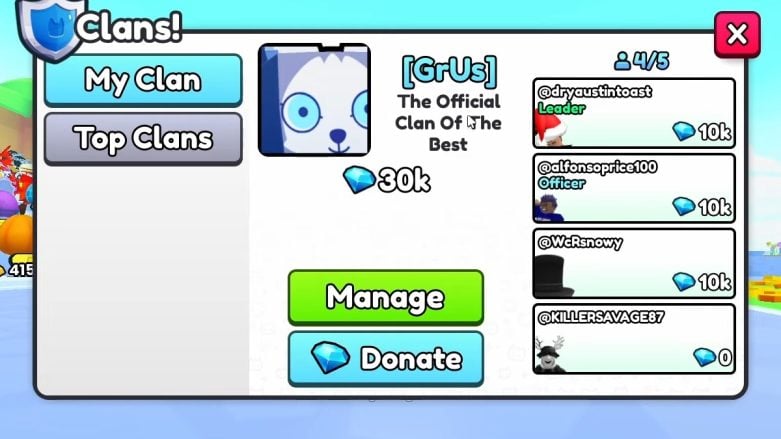
Creating a clan in Pet Simulator 99 is a cool way to team up with friends and other players. Clans add a fun social part to the game and come with some benefits. But before you can begin to invite members, you need to take care of a couple of things, and this guide will help you.
We have more PS99 guides if you visit our guide section. Check out When Does The Jungle Boss Fight Start, How To Make Summer Gifts, and Seashell farming.
Pet Simulator 99 – How To Make A Clan
The main thing you need to do to start a clan is to have been reborn in Pet Simulator 99 at least two times. Rebirth is when your progress gets reset, but you get to keep some extra powers. This makes sure you’re a seasoned player before you try making clans.
Once you’ve been reborn twice, go to the white box at the bottom of your screen and see a blue shield icon. If you haven’t been reborn twice, this is pitch black. This blue shield icon is the Clans menu. To make a clan, you’ll need a Clan Voucher. Sadly, Clan Vouchers cost 300 Robux, which means this is a pay-to-have feature.
If you have lots of Robux and meet the rebirth requirement, click on the blue shield icon. The menu will ask you to write out some things before anything is created. Choose a special four-letter tag for your group. This tag will show next to your group name in leaderboards and chat. Remember, you can’t change this later, so choose carefully! Pick a cool name for your group and write a short description (up to 64 characters) that tells potential members what your group is all about.

Then, you press “Create” to make your clan. This is when the game will ask you for a voucher or 300 Robux to buy one. Once you’ve made your clan, you can take care of it from the Clans menu. You can invite friends, control clan stuff like description and icon (you can change the icon, but not the tag), and see how your clan is doing and where it ranks on the leaderboard.

With your group set up, it’s time to recruit members! Keep in mind that a strong and active group is important for success because Diamonds need to be donated by other members, too. Have fun!
How Do I Change Clan Description & Icon?
With the Summer update, Pet Simulator 99 added a way to change Can Icons and descriptions:
- Press the white box at the bottom of your screen.
- Tap the blue shield (Clan icon).
- In the pop-up menu, select Manage.
- Within the clan management menu, choose Settings.

The settings menu will allow you to change the clan description and icon.





Comments