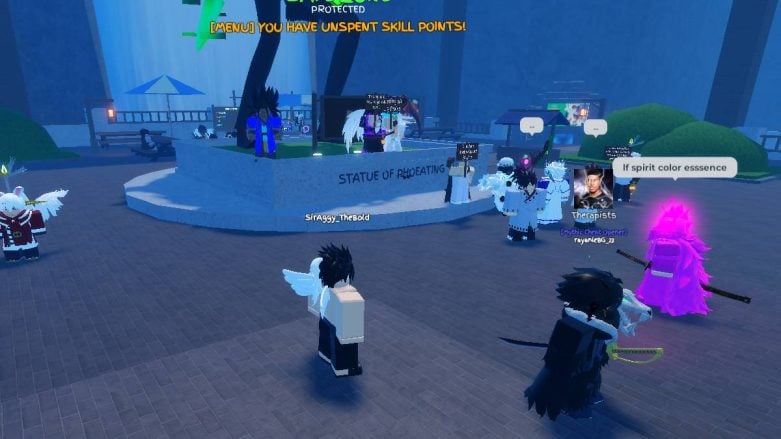
The Trading Hub is one of those things in Grand Piece Online (GPO) that can be difficult to find if you don’t know where to go. It’s a great place to trade your items; it’s safe, and plenty of players use it to get ahead. Below, we’ll show you how to get there. Don’t worry; all levels are welcome.
Looking for free items and boosts for GPO? Check out our Grand Piece Online Codes page! Otherwise, check out our guides on how to get ships, fighting styles, and Devil Fruit.
How Do I Get To The Trading Hub In Grand Piece Online (GPO)?
When you start Grand Piece Online (GPO), you do not go to the main mode to get to the Trading Hub, so avoid pressing Set Sail immediately. Instead, when you start the game, go to Universal Hub. When it’s done loading, you’re going to press the Change button on the bottom left under the “???”. Next, press the Trading Hub. This is similar to how to get to Battle Royale Mode.

The game will not ask you anything else, it will automatically teleport you to the Trading Hub. This part of the game is a Safezone, so you cannot fight anyone. You will arrive with everything in your backpack. To participate in trading, head over to the very big and tall statue that’s near the bridge. You can see it from just about anywhere on the island.

We’d recommend buying a sign in the main game before coming because a lot of people just go AFK here holding a sign that says what they sell.
You cannot buy anything here to take to the Battle Royale Mode, so don’t bother trying to get items that revive teammates. Also, you cannot ping in Trade Hub.
You can buy mythical chests or grips here from the regular shop. The grip rates are Rare (69%), Epic (20%), Legendary (10%), and Mythical (1%). Other than that, there’s a portal that leads to another Roblox experience. These changes are based on what the developers want them to be. Don’t bother looking around the island for anything. I went all over and couldn’t find anything but these three things.



Comments