Navigating the vastness of space in Starfield is an adventure in itself. One of the essential skills you’ll need to master early on is docking your ship. Whether you’re visiting a new planet, a new destination, negotiating aboard another friendly ship, engaging in piracy, or simply progressing through the main story, docking is a skill you’ll use frequently.
Here’s our guide on explaining how to dock in Starfield.
Starfield – How Ship Docking Works Explained
Docking in Starfield is a simple but complicated process when exploring the galaxy, as the game doesn’t exactly tell you how it’s done, even when it’s part of a quest. When I first started playing Starfield, it took me a while to figure out how to dock to a space station, so I accidently shot it, then crashed into it. Luckily, I had just quicksaved… So here’s a step-by-step guide on my experience:
Related: Can You Unlock New Weapon Skins in Starfield?
Targeting in Starfield
Before you can dock, you need to select your destination, aka a starship or a space station such as the Eye or Nova Galactic Staryard. No need to open up the Starmap When playing on PC, press the ‘E’ key, or on Xbox Series X/S, press the ‘A’ button. Cycle through available targets until you’ve selected the desired ship or space station.
Hailing in Starfield
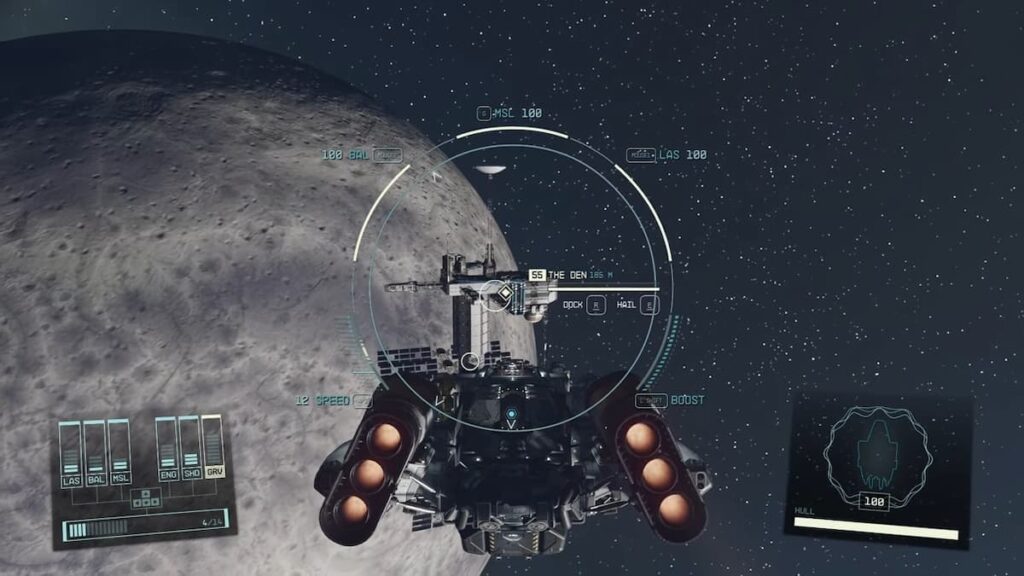
After you’ve done this, you’ll see a Hail button prompt appear. If you hold down the E key or A button, you will hail the ship. However, this is not necessary to board the vessel. It could be said it’s common courtesy, but half the time, you won’t get a response because Spacers or Mercenaries have already killed everyone on board!
Related: How to Fix Starfield ‘Into the Unknown’ Bug
Docking in Starfield
Once you’re within 500 meters of your target, a new word will appear next to Hail, and it will say Board. Hold the X button or R key. This action will connect your ship’s airlock to the other vessel automatically, allowing for safe passage between the two. As long as you are within 500m of the target, you don’t have to do anything, such as off the ship’s engines.
Post-Docking in Starfield
A cutscene will take place if you’ve docked correctly. After successfully docking, you’ll find yourself in the pilot’s seat. From this position, you can choose to board the other ship instantly from the cockpit, undock, or simply explore your own ship. The same options will be available after returning from boarding the vessel.
Can You Fast Travel While Docked in Starfield?
While the idea of fast travel is tempting, especially when docked, it’s not possible in Starfield. To fast travel, you’ll need to undock first. To do this, press the ‘Y’ button on an Xbox controller or the spacebar on a keyboard when seated in the pilot’s chair. Once undocked, the vastness of space is yours to explore once again.
Can You Board Ships During Combat in Starfield?
Engaging in combat is thrilling, and Starfield offers an added layer of strategy: boarding enemy ships. To board an enemy vessel, avoid destroying it. Instead, aim for its engines. Once disabled, follow the standard docking procedure to board. This tactic adds depth to space combat, allowing for varied approaches to confrontations.

Comments