Adopt Me – How To Recolor Vehicles

If you want to recolor your vehicles, you're in luck, because we have everything you need to do to recolor your cars, boats, and more in Adopt Me!
Roblox Adopt Me Vehicle Repaint All
Image: Play Adopt Me!

Adopt Me is giving players a cool way to personalize their rides! You can now give your vehicles a fresh coat of paint with the recently added recoloring feature! This guide will walk you through repainting your car, plane, or any other rideable vehicle.

If you want freebies, visit our Adopt Me codes page. You should also check out our guides on How To Open And Use Hotbar, How To Skip Open Sticker Pack, and all eggs and how to obtain them.

How To Repaint Vehicles In Adopt Me

You need to head to the dealership in Adopt Me to recolor your vehicle. This means you need to leave your neighborhood and head to the main hub. Once there, find the white dealership building. Go inside once you’ve found it.

Roblox Adopt Me Vehicle Car Dealership
Screenshot: Try Hard Guides

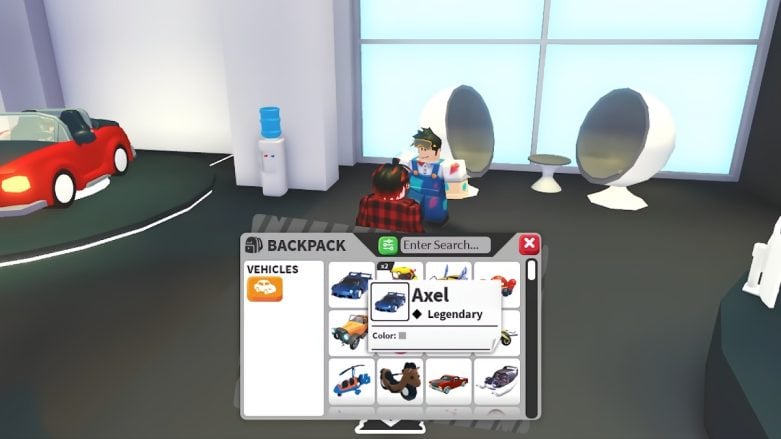
Look for a friendly NPC named Cole. Cole has a paint bucket and paint, and he’s dirty with paint. Walk up to Cole and press the E key on your keyboard to interact with him. This will open your backpack, revealing all the vehicles you currently own.

Roblox Adopt Me Vehicle Car Cole Recolor
Screenshot: Try Hard Guides

Pick the vehicles you’d like to recolor from the selection of vehicles in your backpack. The selection is huge and is more than you’d expect. You can recolor planes, bikes, cars, motorcycles, boats, unicycles, roller skates, scooters, and more.

Roblox Adopt Me Vehicle Recolor
Image: Cookie Cutter

Once you choose your vehicle, a new screen will pop up showcasing a color palette with 58 different options. Choose the color you want to repaint your vehicle. Once you pick the color, you can press repaint. Repainting a vehicle will cost 50 Bucks.

Your chosen vehicle will have a brand-new paint job, and you can do this as many times as you’d like.

Jorge A. Aguilar

Jorge A. Aguilar

Jorge A. Aguilar, also known as Aggy, is the current Assigning Editor.

He started his career as an esports, influencer, and streaming writer for Sportskeeda. He then moved to GFinity Esports to cover streaming, games, guides, and news before moving to the Social team where he ended his time as the Lead of Social Content.

He also worked a writer and editor for both Pro Game Guides and Dot Esports, and as a writer for PC Invasion, Attack of the Fanboy, and Android Police. Aggy is the former Managing Editor and Operations Overseer of N4G Unlocked and a former Gaming editor for WePC.

Throughout his time in the industry, he's trained over 100 writers, written thousands of articles on multiple sites, written more reviews than he cares to count, and edited tens of thousands of articles. He has also written some games published by Tales, some books, and a comic sold to Telus International.

More Content

Comments

Leave a Comment

All comments go through a moderation process, and should be approved in a timely manner. To see why your comment might not have been approved, check out our Comment Rules page!

This site is protected by reCAPTCHA and the Google Privacy Policy and Terms of Service apply.