
Roblox Anime Warriors is a game that has you fighting against waves of enemies from your favorite anime worlds. You will be controlling some of the most well-known characters from those anime, and you will want to be able to equip your new heroes so you can battle it out with them.
Be sure to check out our Anime Warriors codes page to get free stuff that will help get you some new heroes!
Switching Characters
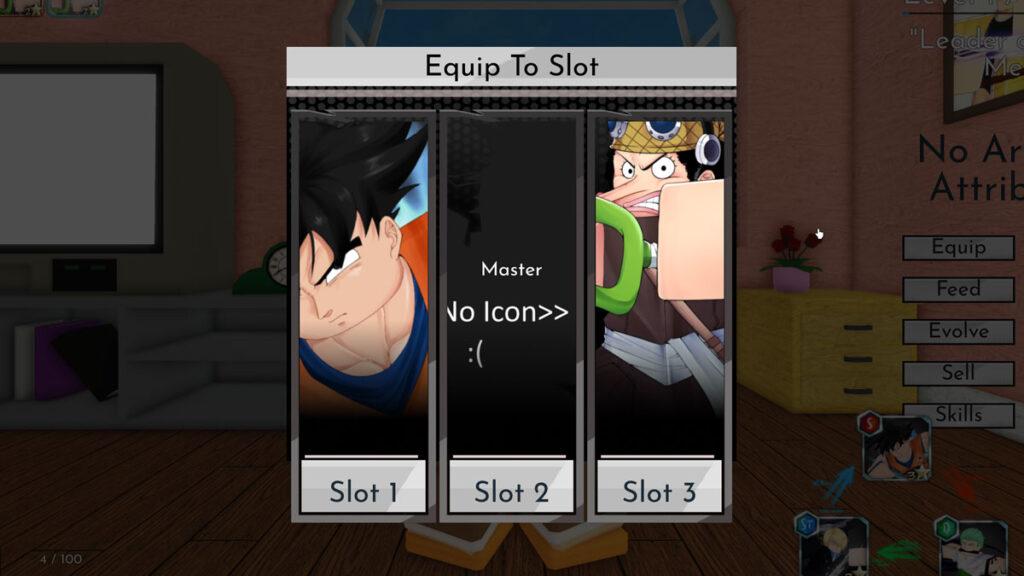
To switch characters, you need to go into your inventory and select a character that is NOT equipped yet. Look for the “Equip” button on the side and click on it. You can now pick the slot where your character will be placed!
The confusing part about this is that if you only have three characters you can’t swap it around. You will only see the Equip button on a character that is not already in your team.

Once you’ve hit the Equip button, you will get access to the slot options. These match up to where your character will end up in your rotation. Whoever is in the first slot is the character you will start with in the lobby or in a game.
That’s all of the information we have on how to switch characters in Anime Warriors! We have guides on how to get crystals, artifacts, and a list of all the characters in the game to check out.




Comments